Journaling, Collage, Reflection, and Baking

Category: Weekly Reflections

This is the category to apply to your Weekly Reflection posts from the course.

Reflections on the Ed Camp experience

This week our class had the opportunity to participate in an Ed Camp, a professional development opportunity where we discussed topics related to teaching and learning with our peers. Some of the topics we discussed were the use of AI in the classroom, how physical education and technology can work together in the classroom, and the role of nature-based education.

The group that I participated in was discussing the role of nature-based education, its benefits, and ideas for how it can be incorporated into the classroom.

One of the main things we discussed was that some schools have really good outdoor setups and others don’t which impacts a teacher’s ability to incorporate nature-based learning. If a school has outdoor spaces that facilitate that kind of learning it is very beneficial to students, but not all schools have that because of financial or environmental factors. Another piece that was shared is that some schools may have restrictions or guidelines about when a teacher can take their class outside.

We considered that nature-based learning could be great for accommodating the needs of different learners. Some students work best with hands-on activities and opportunities for exploration. Additionally, going outside for a lesson could be the change of scenery that your class needs for their focus and engagement. That being said, creating opportunities for nature-based learning would depend on the grade level and your class’s overall disposition. Outside time is great for learners of all ages, but an older grade might focus better during an outside lesson.

Finally, we discussed how exploration and hands-on discovery experiences are great for learning as long as they are paired with some more structured activities. For example, a nature-based lesson could be paired with a worksheet to reinforce learning or another kind of project to ensure that the learning sticks.

My inspiration to include nature-based learning in my future classroom largely comes from my own experiences in elementary school. The school that I attended, Pauline Johnson Elementary School in West Vancouver (School District 45), had lots of outdoor spaces such as a First Peoples’ healing circle, an outdoor classroom with a white board, and a small ampitheatre. The park was finsihed in 2017 and has been an amazing addition to the school and the community. As a student, I loved being able to go outside for our lessons and independent work time for our projects. To learn mroe about the park and its creation check out their website: PJ Outdoor Learning and Community Park

Overall, my experience of participating in our class’ Ed Camp was great! I enjoyed the opportunity to discuss topics related to teaching with my peers in a low-stress environment. It was interesting to see what we as a class could come up with and make connections about what is important to us as future educators.

— Sofia 🎀
Reflections on Artificial Intelligence in Education

Last week, we had the pleasure of speaking with Cari Wilson, the Vice-Principal of Innovation and Technology at School District 45, West Vancouver. This felt extra special to me because I grew up in West Vancouver and attended SD45 schools for my entire K-12 education. I was very interested to learn more about the district on the Educator side, having looked at it from a student perspective for most of my life.

We started the session with an exercise called the 3 W’s. We were encouraged to share one “I wish”, one “I wonder” and one “I worry”. Some of my thoughts about Artificial Intelligence(AI) were that I wish we could teach young students how to use it responsibly, I wonder how AI will continue to grow, and I worry that the students’ use of AI will discourage creative thinking and learning through trial and error. To be honest, I have a lot of worries and reservations about the use of AI in schools and in general. I rarely (if not never) use AI in my daily life and for my schoolwork, so the idea of using AI in the classroom makes me nervous.

Students currently in primary grades are the first generation of children to grow up with AI, so we have the unique opportunity to teach them how to use it responsibly at a young age. One of my worries about AI is that it is a part of a technological takeover that is continuing to grow. However, I know that technologies will continue to be developed and improved upon and now is the opportunity to learn how to work with technology and grow with it.

Something I found especially interesting from Cari’s presentation was when she talked about how AI actually works, specifically generative AIs like Chat GPT and Language Learning Models. One thing that made me nervous about AI is that I didn’t know how it works; they felt like mysterious and supernatural presences in my life. After learning how they actually work, they seems less intimidating to me.

I’ve linked a video below that explains how generative AI programs work:

Next, Cari talked about some concerns around the use of AI in schools. One of the major ones being privacy. When using AI it is very important not to share personal information about students like their photos, their age, and their name. For example, if you are using an AI program to help generate comments for students’ report cards, be sure not to include their name or age. Generative AI programs train on large amounts of data, and the information that you share in yoru prompts can also be stored and used.

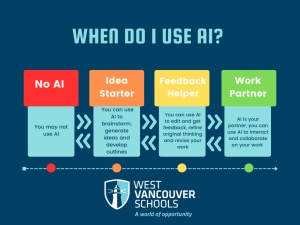
Another concern is regulating responsible use of AI and ensuring that students are adhering to academic integrity standards. This concern is more relevant for older grades when students work more independently from teachers. AI can be a great tool for brainstorming ideas and for project feedback, but it is important to be transparent about its use. One of Cari’s suggestions was to have zones for AI use. Red is for “no AI”, orange for “Idea Starter”, yellow for “Feedback helper” and Green for “Work Partner”. I really like this diea because it reminds me of the sel-regulation zones used in elementary classrooms. The zones would be used by a teacher to determine the time and place for the use of AI for assignments.

Zones for AI use, image taken from Chris Kennedy’s blog, The Culture of Yes

Some other concerns that stood out to me were hallucinations and deep fakes. Hallucination is a term for when an AI program gives an answer that is false. It is important for students to learn how to recognize false information and not to blindly trust AI. Deepfakes are a form of synthetic media that depict real of fictional people. They often represent people inauthentically and can aid the spread of misinformation. The concern for learning would be that students are not able to recognize this form of synthetic media and they would trust false information spread by these deepfakes.

Despite all these concerns about the use of AI in the classroom, AI tools can make a world of difference for students with learning differences. Differentiation is an important part of making lessons accessible for all students, and with AI tools, it is much easier and more effective. Some tools that Cari recommended for teachers are Chat GPT, Google Gemeni, Perplexity, Diffit for teachers, Magic School AI, Brisk AI for Teachers, and Notebook LLM.

Although the use of AI in classrooms makes me nervous, I acknowledge that if I become more comfortable with it now, I can help my students in the long run. After having the session with Cari, I feel more informed and ready to explore what these AI tools have to offer!

— Sofia 🎀

Reflections on Media Making with UVic Libraries

A few weeks ago we had a session with Rich McCue from the UVic Libraries Digital Scholarship Commons. We talked about image editing, video editing, filimg tips, and podcasting. We started by discussing the importance of making resources as a teacher. Whether its for students or colleagues, photo and video editing is relevant for learning how to present information in a professional and helpful way.

We also had a brief aside about safety around uploading photos and personal information. Rich pointed out that the servers for Google Photos are stored in the United States, and that generally any information that you upload to photo editors are stored by the providers. Meaning that as teachers, we need to be careful not to share student information.

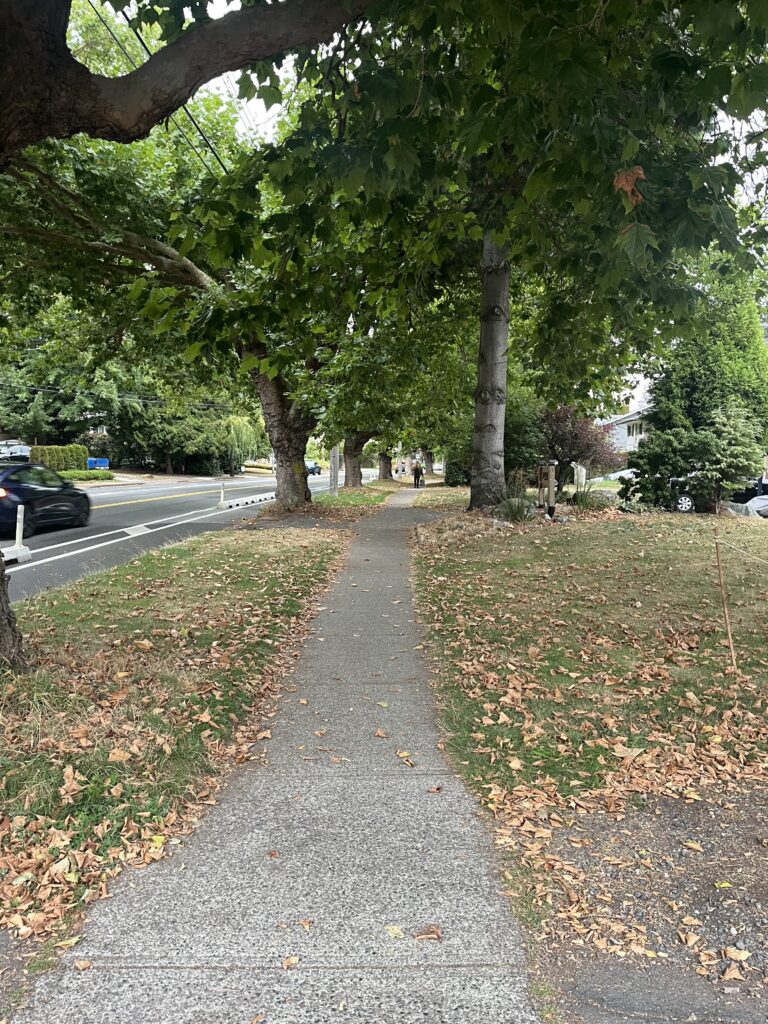
Next, we did a photo editing activity. I used a picture from one of my walks a few weeks ago.

Photo taken by Sofia Huster

I had never used Google Photos Editor before, so I just experimented with the different filters they offer. I was surprised at how easy it was with the help of the different suggestions on the side.

We also discussed video editing and filming tips. We looked over different examples of student-made videos and Rich pointed out what parts of the filming/editing were good and what parts could be improved upon. Afterwards, Rich shared some tips for filming videos including: using a tripod, using an external microphone, being careful with wind, testing audio on location, using a clap.

I really appreciated learning about how to level up my video editing, especially as I work on final projects for the semeser.

Finally, we talked about podcasting as an option for project formats. Podcasts are great because they are a more intimate way of presenting information and are usually meant for smaller, more niche communities. As long as you have a way to record audio, they are also easy to produce. Some of Rich’s suggestions were to try to tell a story, to build up to a star moment, and to end with a positive take away on your topic.

Overall, I found the session with Rich very helpful! As someone who does video editing for personal and school projects, I appreciated the tips and strategies on how to make my videos more professional. Also, as someone who doesn’t have a lot of photo editing experience, I enjoyed the opportunity to try out some Google Photo Editor features in a low-pressure environment.

If you are interested in learning more about photo and video editing, Rich’s blog has a lot of different courses that you can follow along for free!

— Sofia 🎀

Reflections on Digital Literacy in Schools

Our topic of conversation in class a few weeks ago was about digital literacy in schools. This topic is increasingly relevant to educators because technology is always growing, and we need to know how to address and include it in our classrooms. Technology and its use in schools is a topic of conversation that is always coming up, but it never has a concrete solution. What we consider new technology now, will seem ancient in a few years when there are new, emerging technologies. Our students are shaped by what is going on in the world around us, so in order to create safe and engaging class environments, we need to teach our students how to work responsibly with technology.

Recently in British Columbia, new codes of conduct have been implemented to restrict students’ use of personal digital devices in schools. Linked here is an article from CBC titled “B.C. districts to restrict cellphones during 2024-25 school year” that dicusses the new changes, how the rules will be enforced, and reactions from administrators and teaching staff. The general reason behind this change is that the government hopes to reduce distractions in schools, but there are some downsides to this ban. Our guest speaker from class suggested that banning phones in the classroom could put certain students into a situation of crisis, which prevents them from being ready to learn.

The video below discusses some perspectives on why phones should be banned in schools as well as student and parent perspectives on why they are a useful tool and important for student safety.

Our guest speaker suggested a way to discourage the use of personal devices in the classroom without fully excluding them: To have a 2 minute phone break in an 80 minute instructional block. It allows students to have a break and check their phones for two minutes before resuming a lesson, but if one student uses their phone when they are not supposed to, the whole class will lose out on that privilege.

Another thing to consider is that children learn their habits from their parents. If the adults in a child’s life are always cheking their phone or scrolling on social media, kids will think that is appropriate and healthy behaviour. So if we want young kids to learn to have healthy separation from their devices, we have to model that behaviour for them.

While the issue of banning personal devices in schools is not very relevant to teaching primary grades, internet safety is very important for keeping kids safe. It’s important to teach kids to use the internet safely for technologies they may use in the classroom, but also for technologies they may be using at home. Communicating with strangers is a big concern as well as accessing content that is inappropriate for certain age levels.

I was curious about how to properly introduce internet safety to young students, so I found a great video that students can watch that provides some simple rules and guidelines for being safe online. I like this video because it uses fun animations and examples that younger kids could understand.

While the use of technology in the classroom can seem daunting, there are so many useful tools that can benefit student learning. This is something that I have had to reflect on because I can often be hesitant to use technology. But, as previously mentioned, technology will continue to evolve and influence new generations of students. We need to learn to work with technology in order to teach our students to use it safely for learning.

— Sofia 🎀

Reflections on Multi Access Learning Pathways

In class a few weeks ago, we had a great discussion about multi-access learning pathways in school environments. We discussed the different ways this can look, the benefits of it, and real examples of implementations of this model at the University of Victoria. If you would like to explore the subject further, here is the link to the presentation by Valerie Irvine.

I find this model very interesting because I have never experienced this learning format before. I have taken fully in-person classes and fully online classes, but never a course that had options for both that students could choose between. I have experienced in-person classes that integrated online learning in the case of a teacher’s illness or extreme weather conditions, but the option of attending class online was not a frequent option.

While, I am generally on board with this model, I have some personal reservations. Through all my years as a student, I have always felt that I learn and focus best when I am physically in a school environment. I wonder if I would focus as well if I attended online class on a more regular basis. Even though I personally would prefer to attend class in person, I appreciate that the multi-access learning model opens up ways for all students to be able to participate in the course in their own way. Some students have a long commute, some have children or other family members to take care of, and some have health-related issues that prevent them from attending class in-person. Additionally, the multi-access learning model allows for change. You could attend class in-person one day, and the next day attend online. If you are having an off day, or something comes up, there are options for participating in an environment that works for you.

In our course, we have also discussed how this model can be applied to elementary school classrooms. One of the suggestions was to create a blog for your class so that parents of children who miss school could catch up on the material that was missed. I like this idea because it creates a way for students to stay up to date, for parents to be able to see what is happening in the classroom, and it creates a record of the teacher’s lessons and activities for future years.

Thinking more about the multi-access learning model made me reflect on how I could implement it into my future classroom. I found a book titled “Online by Choice: Design Options for Flexible K-12 Learning” by Stephanie L. Moore and Michael K. Barbour that discusses different options for blended learning in schools, meeting learner needs, and building an online community. I haven’t had a chance to read the whole book yet, but I have already found it really helpful in terms of guidance for implementing online learning options in the classroom.

Although online learning is something that can make me feel uneasy, I am open to exploring ways that I can implement it in my future classroom with the end goal of helping my students. I think an approachable way of starting with this would be to create a class website or blog, and then different things can be implement as you go. I appreciate that multi-access learning and blended learning can create ways for students to be active in the classroom in a way that they wouldn’t necessarily have been able to with out it.

— Sofia 🎀

Reflections on Open Education in K-12 and Cable Green

A few weeks ago, I watched a session with Cable Green, the director of Open Education from Creative Commons. He had a lot of interesting things to say about access to educational resources and barriers in our education system. When I looked into his role on the Creative Commons website, I found that he “works with open education, science and research communities to leverage open licensing, content, practices and policies to expand equitable access and contributions to open education”. I linked the Creative Commons website and the page about Cable Green above if you would like to learn more about what they do!

He started by talking about what inspired his work with open education. He explained that the late 1990’s and early 2000’s brought lots of change to education with the creation of the world wide web and increased access to computers and laptops. This lead to a unique opportunity to be able to share resources with people all over the world, the only problem being that everything is copyrighted by default. So Creative Commons created a way for people to share their knowledge and retain their copyright, but also allow for other people to use and modify your resources.

I find this topic very interesting, especially because I don’t know as much about copyright as I should. I am more familiar with copyright in the context of books, because I’m used to opening up the first page and seeing the the copyright and publishing details. To seek more clarification on exactly what copyright is, I found this great video on Youtube made by Innovation, Science and Economic Development Canada. I linked below for anybody who would like to take a look.

Also on the Creative Commons website is an “About CC Licenses” page about the different types of licenses they offer. The most permissive option is one that allows reusers to “distribute, remix, adapt, and build upon the material in any medium or format, so long as attribution is given to the creator”. This license allows for the most change from the original material and requires that the original creator is given credit. At the other end of the spectrum is the most restrictive license, which allows “reusers to copy and distribute the material in any medium or format in unadapted form only, for noncommercial purposes only, and only so long as attribution is given to the creator”. I think these licenses are so interesting and a great way to share resources with people around the world! It seems like an easy enough process and allows for more access to knowledge in all kinds of situations.

Learning more about copyright and Creative Commons led me to think about how I could teach these topics to my future students and encourage digital literacy in my classroom. I found a great article on Edutopia.org titled “How to Teach Copyright and Fair Use to Students“, by Karen Lagola. The approach to introducing this topic certainly depends on the grade you’re teaching, but I think this article has lots of great tips that could work for all grade levels. For example, one of the suggestions is to “Empower Your Students as Creators”. I think that this could work as early as Kindergarten. Although they are probably not posting their work on the internet, the principle of respecting their work and them as creators of it is important to introduce. Once you get to the older grades, you could start introducing them to the terminology, what it means, and guiding them through the processes of creating their own licenses for their work through Creative Commons.

I’m glad that through this online recorded session I was able to learn more about copyright and Creative Commons licenses. As I enter my teaching career this is something that I hope to teach my future students about. Technology in our world is only becoming more abundant and innovative so it’s important that young students know about how to properly interect with other people’s work on the internet.

I hope that this post can be helpful to others like me who don’t know a lot about copyright and Creative Commons licenses, but would like to. I’m happy that during this process I found some resources that can hopefully help my future students as well as other teachers.

— Sofia 🎀

Reflections on the Pacific School of Innovation and Inquiry

This week, I had the pleasure of touring the Pacific School for Innovation and Inquiry in downtown Victoria, founded and co-run by former Gulf Islands School District Superintendent Jeff Hopkins. Our class had the opportunity to hear from Jeff, tour the school, and speak with some of the students. I entered the experience not knowing what to expect, and I left inspired and intrigued.

Jeff started the session by talking to us about the mission behind the school and how the school works. The students choose an inquiry question and attend sessions that help them along with their research and broaden their knowledge on related topics. By exploring their inquiry, the majority of students meet curriculum requirements and sometimes even graduate early. At first, I was skeptical about this model of schooling, but after hearing Jeff speak about the school and answer all of our questions I found myself wishing that I could have gone to a school like this when I was in highschool.

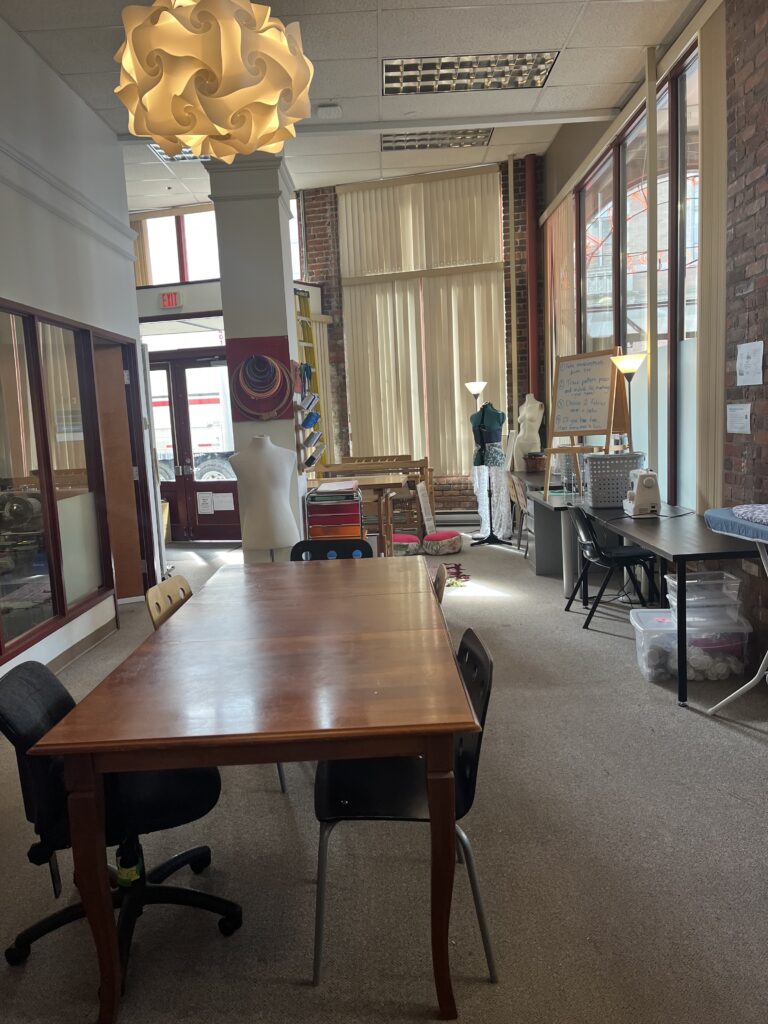
photo taken by Sofia Huster

My favourite part of the tour was getting to see the creative working space. As a sewer and general textiles enthusiast, seeing this space was so exciting. They have tons of bins of fabrics and other materials, sewing machines, sergers, mannequins, and even a loom for weaving. I couldn’t help but imagine all the projects I could make and how it could all connect to learning outcomes in other subjects. The textiles space is not the only creative workspace they have. The studio also houses a small theatre, a small woodworking shop, a ceramics studio, and music rooms.

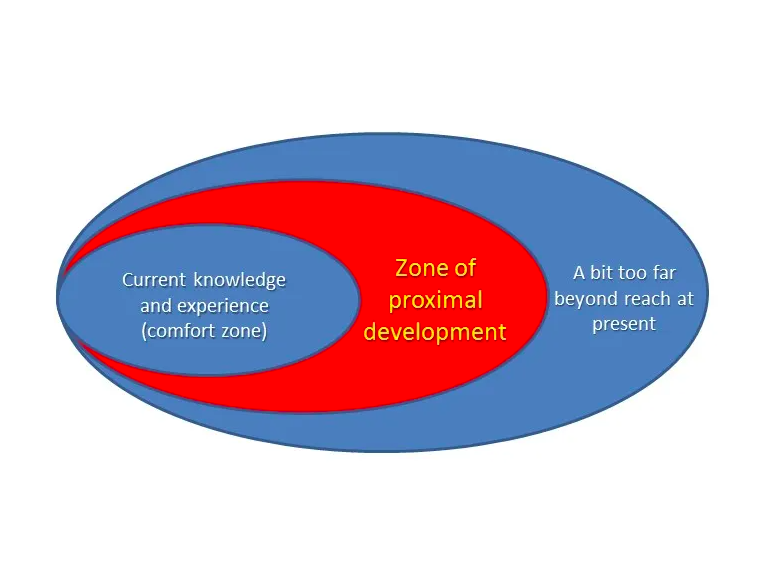
Another thing that stood out to me was a term that Jeff mentioned: the Zone of Proximal Development, developed by Lev Vygotsky. I recognized the term from my Grade 12 psychology course, but it was interesting to hear Jeff talk about it in the context of the school’s approach. The diagram below is a visual for the term. Essentially, it describes the zone between what is too easy for a learner and what is too difficult. The zone represents the optimal content that challanges someone. Jeff mentioned how this term is very important for the school’s model but also for us as elementary school teachers.

Zone of Proximal Development Diagram, PSII Victoria

Overall, I’m grateful for the opportunity to have toured the school. I had never been exposed to this type of school growing up and I think it would be so cool to be a student there. We had the chance to talk to some of the students and they seemed so focused and inspired. I very curious to see how this model of school will expand and how its approach can be implemented in more schools in the future!

— Sofia 🎀

Reflections on the “Most Likely to Succeed” Documentary

Most Likely to Succeed” is a documentary film directed by Greg Whiteley, released in 2015. The film explores new perspectives to education including a relatively new approach from High Tech High School in San Diego, California. The school’s focus is heavily weighted on “soft-skills” like confidence, leadership, and group collaboration. While focusing on two Grade 9 classes, the film shows the process of their learning throughout the year. Each class works with two teachers, for example one physics teacher and one humanities teacher. The students would explore both subjects and at the end of their term, create a project to feature in the school’s showcase, open to the students’ families, friends, and community.

This approach fascinated me because this is not something that I had seen or considered before. In theory, the emphasis on entrepreneurship, leadership, confidence, and collaboration in a high school setting is a great idea, but like some of the parents of High Tech High students, I was a bit skeptical. The parents’ main concern is that their children won’t be able to succeed on standardized tests that will secure their way to a post-secondary institution.

In the film, they explain the reasoning behind High Tech High’s approach. Their rationale is that while students in standard secondary schools pass tests and get accepted to universities and colleges, they don’t retain any knowledge from their courses long-term or learn any useful skills for a world outside of school. So, High Tech High aims to teach kids those skills through an in-depth exploration of some subjects, rather than a surface level one of a wide breadth of subjects.

I do agree with their reasoning, but the unknown results fo this experiment made me nervous while watching the film. Ten years ago, when the film was released, High Tech High was still relatively new. So there wasn’t any information on their long-term success rates in the film. As I looked into the current success rate of the program on the High Tech High Website, I saw that 82% of their graduates in 2022 attended college and that 95% of their senior students “indicat[e] readiness for college-level coursework”.

The video above, is one that I found on youtube while exploring High Tech High. It shows a preview into a class at High Tech High creating video games and interactive art pieces inspired by their conversations about propaganda and social movements with their English teacher.

As I reflect more on the glimpse into High Tech High from the documentary and the youtube video, I keep thinking about how cool it would have been to do a project like that when I was in school. Projects like making a mechanism out of gears that represents a theory on the chute of civilizations, or the daunting task of writing and producing your own play on Ancient Greece seem very nerve-racking to me. However, I imagine that the students must feel so proud and accomplished when they present their projects at the showcase.

Even if the students at High Tech High do not follow a traditional school model, I have no doubt that they are learning useful skills for their adult life. I recognize their rationale and I’m curious to see the results of the school after a few more years. Overall, I think it’s great that they are trying something new that will hopefully inspire generations of innovators and leaders.

— Sofia 🎀

© 2026 Sofia's Blog

Theme by Anders NorenUp ↑